
syracuse.com
Advance Media New YorkNews & Magazines
2.6305.00 Reviews
- Version
- 5.0.0
- Installs
- 50.00K
- Age Rating
- Teen
Screenshots




Our Review of syracuse.com
 Analysis by Appyee
When syracuse.com is useful, it is because local details can change what I do that day: a road disruption, a school or civic story, a sports result, or an event worth planning around. I would treat it as a focused local-news companion rather than a replacement for every source of information. Its subject is Central New York, so the benefit is relevance; the trade-off is that readers looking mainly for national or international coverage will need another outlet alongside it.
Where the experience can snag
News apps can feel inconsistent even when the basic layout is easy to understand. An alert may lead me to an article when I have only a moment to read, while a longer story is better saved for a quieter break. Comments can add local reactions, but they are not a substitute for reporting: I read them as opinion and conversation, not as confirmation of the facts in a story.
There is also a practical distinction between seeing a headline and getting the full value of an article. If I am checking the app between errands, I can scan what is happening, but I may not have the time or connection to watch a video or read a detailed report. I find it more useful to choose one or two stories to follow than to treat every notification as something that needs immediate attention.
Checks that make setup smoother
The app is free to download, though in-app purchases range from $7.99 to $100.00 per item, so I would check any purchase prompt carefully before continuing. That matters if a family member or a younger reader uses the same device. The content rating is Teen, which is another reason to make sure the app suits the person using it rather than assuming all news content is intended for every age.
If the feed or alerts do not match what I expect, I start with simple checks: confirm that I am signed in if the app asks me to sign in, review any topic choices I made, and check the device’s notification settings. A missed alert does not necessarily mean the newsroom has not covered a story; notifications are only one way of finding it. I can open the app and browse the available sections when I want a fuller picture.
It is also worth keeping expectations realistic about personalization. Choosing subjects can make a feed feel more relevant, but it does not mean every local story will fit neatly into those choices. I would leave room to browse beyond my usual interests, especially when an issue affects the wider community.
A more useful daily routine
For a practical routine, I would check headlines once before leaving home, then use a notification only as a prompt to look closer when the subject matters to me. If I am commuting, I can wait until I am safely stopped before reading or viewing anything; a local update is not worth dividing attention on the road. At lunch, I can return to an article that needs more than a quick glance.
For sports followers, the app can sit alongside a team-specific source: local reporting gives context about the region and its coverage, while a dedicated league or team service may be better for schedules, statistics, or live play-by-play. The same distinction applies to breaking events. I use local news to understand what is being reported in the area, but for urgent instructions I look to the relevant official public-safety channel as well.
When another source is the better fit
The developer is Advance Media New York, and the app has been available since February 18, 2011. Its current version is 4.5.2.2, and it supports devices running Android 8.0 or later. Those details help set expectations for compatibility, but they do not guarantee identical behavior across every device. If the app behaves oddly after an update or on an older phone, I would first check whether the operating system meets that minimum and whether the app itself is current.
Compared with a general news aggregator, a local publication app has a narrower editorial focus. That is an advantage when I want Syracuse-area coverage without sorting through unrelated headlines, but a disadvantage if I want one combined feed from many cities or publishers. A browser can be a reasonable alternative for occasional reading, while the app makes more sense for someone who returns regularly and wants local stories close at hand.
The audience figures also suggest this is an established but not universally loved option: it has over 50,000 installs and an average rating of 2.3 from more than 600 ratings. I would not treat a rating as a verdict on every person’s experience, but I would take it as a reason to approach the app with measured expectations. If smooth, highly personalized reading is your top priority, compare it with other sources before making it your only news habit.
Getting Started with syracuse.com
Diving into the app was a breeze. As soon as I launched syracuse.com, I was greeted with a clean and user-friendly interface. Navigating through various sections is as smooth as a summer breeze in Clinton Square. Whether you're keen on sports, politics, or the latest local events, the app caters to all sorts of interests, making it super handy for staying informed.
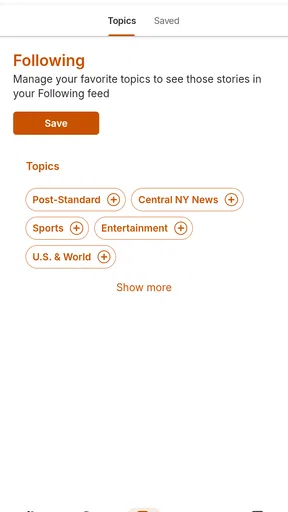
Setting up was straightforward. Just a quick sign-up, and I was all set to customize my news feed. This feature is particularly neat because it allows you to focus on topics you’re genuinely interested in, filtering out the noise and clutter.
Features that Stand Out
One of the features I absolutely love is the real-time notifications. They ensure you never miss out on breaking news. I remember getting an alert about a major traffic incident just as I was about to head out. Saved me a ton of hassle!
The multimedia content is another winner here. Articles are often accompanied by high-quality images and videos, making the information more engaging and dynamic. It’s like having a mini TV station right in your pocket.
Let’s not forget the community aspect. The comments section is alive and buzzing with opinions and discussions. It’s a great place to see what other locals are thinking and even join in on the conversation if you’re feeling chatty.
Usability and Performance
On the performance front, the app runs smoothly. I didn’t encounter any major lags or crashes, which is always a win in my book. The developers have clearly done a great job optimizing it for both Android and iOS platforms.
The app’s design is intuitive and modern, with a pleasant color scheme that’s easy on the eyes. It's a small detail, but when you’re spending a lot of time scrolling through news, it makes a difference.
Personal Take
Now, let’s talk about my personal experience. I’m someone who loves staying updated but doesn’t always have the time to sit down and watch the news. That’s where syracuse.com shines. I can catch up on the latest headlines while on the go, whether I’m waiting in line for coffee or taking a quick break at work.
There’s also something special about the local touch. It feels more relevant and immediate compared to national news, which can sometimes feel distant. Plus, supporting local journalism is something I’m happy to do.
Final Thoughts
All in all, syracuse.com is a fantastic app for anyone living in or interested in the Syracuse area. It’s comprehensive, easy to use, and keeps you informed about everything from local politics to your favorite sports teams. If you haven’t tried it yet, I’d definitely recommend giving it a go. It’s like having the pulse of Syracuse right at your fingertips.
So, next time you’re looking for the latest news, give syracuse.com a try. You might just find yourself a little more connected to the heart of the city.
Verdict
Strengths of syracuse.com
- Comprehensive local news coverage.
- User-friendly interface design.
- Timely updates and alerts.
- Personalized content options.
- Offline reading available.
Limitations of syracuse.com
- Limited national news coverage.
- Occasional ad interruptions.
- Some features require subscription.
- App size can be large.
- Notification settings need improvement.
Similar Picks in This Category
View All
Google News - Daily Headlines
Google LLC4.0

X
X Corp.4.8

Flipboard:Your Social Magazine
Flipboard3.4

Opera News: breaking & local
Opera4.5

Hindi News by Dainik Bhaskar
Dainik Bhaskar Group4.0

Way2News Daily News App
Way2News ( Formerly Way2SMS )4.6
Frequently Asked Questions
What is syracuse.com and what features does it offer?
Syracuse.com is a comprehensive news application providing the latest updates from Syracuse and Central New York. It offers features like breaking news alerts, in-depth articles, local sports coverage, weather updates, and access to multimedia content such as videos and photo galleries. Users can customize their news feed to focus on topics of interest.
Is syracuse.com free to use or does it require a subscription?
The syracuse.com app is free to download and offers a variety of content at no cost. However, some features and articles might be behind a subscription paywall. Users can access premium content by subscribing to their service, which provides full access to all articles and removes ads for a better reading experience.
Can I personalize my news feed on syracuse.com?
Yes, syracuse.com allows users to personalize their news feed. By selecting preferred categories or topics, users can tailor their experience to focus on local news, sports, entertainment, or other interests. This customization ensures that users receive the most relevant and engaging content based on their preferences.
How frequently is the content updated on syracuse.com?
Content on syracuse.com is updated continuously throughout the day. The app provides real-time news alerts and updates to ensure users have access to the latest local news, weather reports, and sports scores. This ensures that you are always informed about significant events as they happen.
What platforms is syracuse.com available on, and how do I download it?
The syracuse.com app is available for both Android and iOS devices. Users can download the app from the Google Play Store for Android devices and the Apple App Store for iOS devices. Simply search for 'syracuse.com' in the respective store and follow the prompts to install the app on your device.
